Italian / Italiano
Due is a reminder app. You write down something you need to do and when you need to do it, and Due alerts you at that time.
This page is about three words used in the app, and how they are translated into Italian. I would like your opinion on them.
All three come from the English word Snooze. So the page starts by explaining what that word means in English, and what each of the three things actually does. The questions are at the end.
Where the word “Snooze” comes from
Think of an alarm clock. You set it for 7:00. It rings. You are awake, but you are not ready to get up.
So you press a button on the clock. The alarm stops. Ten minutes later, it rings again.
In English, that button is called Snooze. People press it because they don’t want to get up yet, but they also don’t want to miss the alarm. The important part is this: the alarm goes away for a short time, and then it comes back.
In everyday English, “snooze” can also mean a short sleep. That is not the meaning here. In Due it always means the alarm-clock button.
What makes Due different
Most reminder apps alert you once. If you miss that alert, nothing more happens.
Due works differently. When a reminder alerts you and you do not act on it — perhaps you are busy right at that moment — Due makes sure you do not forget about it. It alerts you again a little later. And again after that, until you deal with it.
That is the same idea as pressing Snooze on an alarm clock. The difference is that Due does it for you, without you pressing anything. That is why the feature is called Auto Snooze in English.
The three words
Everything below follows one reminder: Lock balcony door, due at 5:55 in the evening.
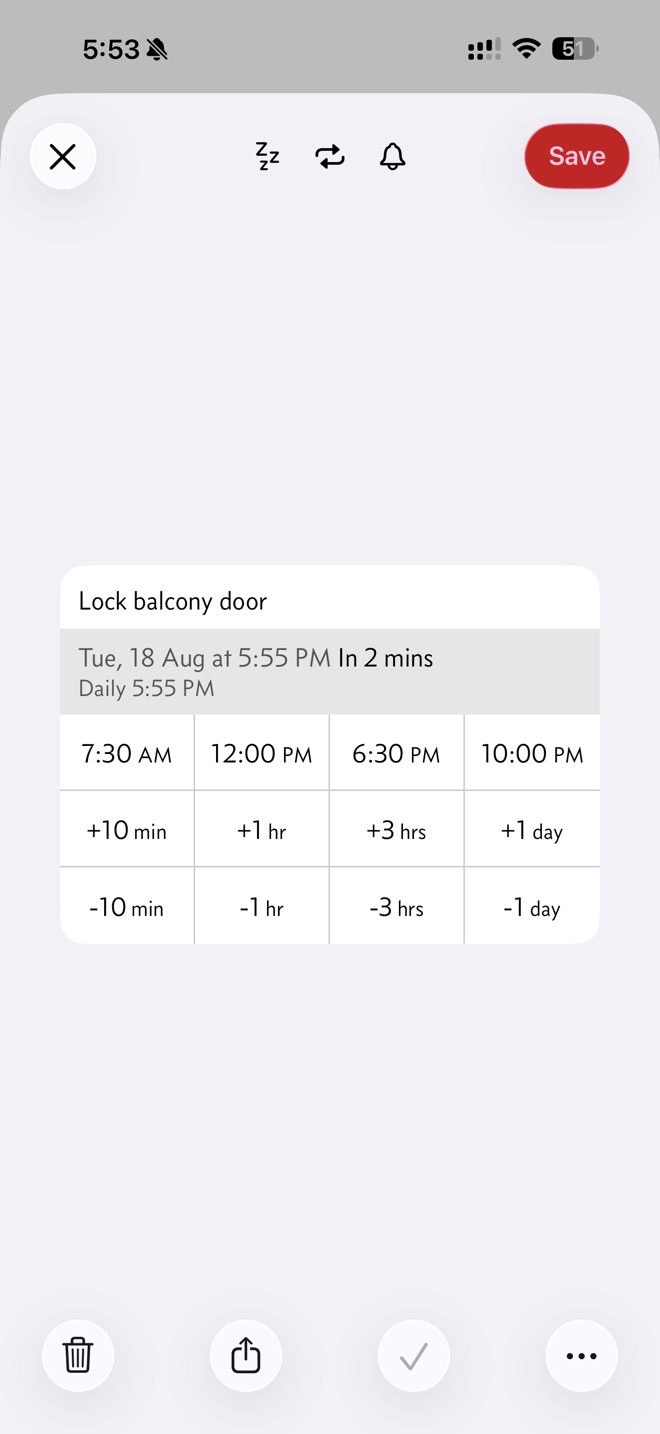
The reminder, shortly before it is due. The Daily line underneath is the Repeat schedule — a different feature, and not one of the three words on this page.
Auto Snooze — Due alerts you again, by itself
One thing was set up in advance: Auto Snooze, set to every 5 minutes for this reminder.
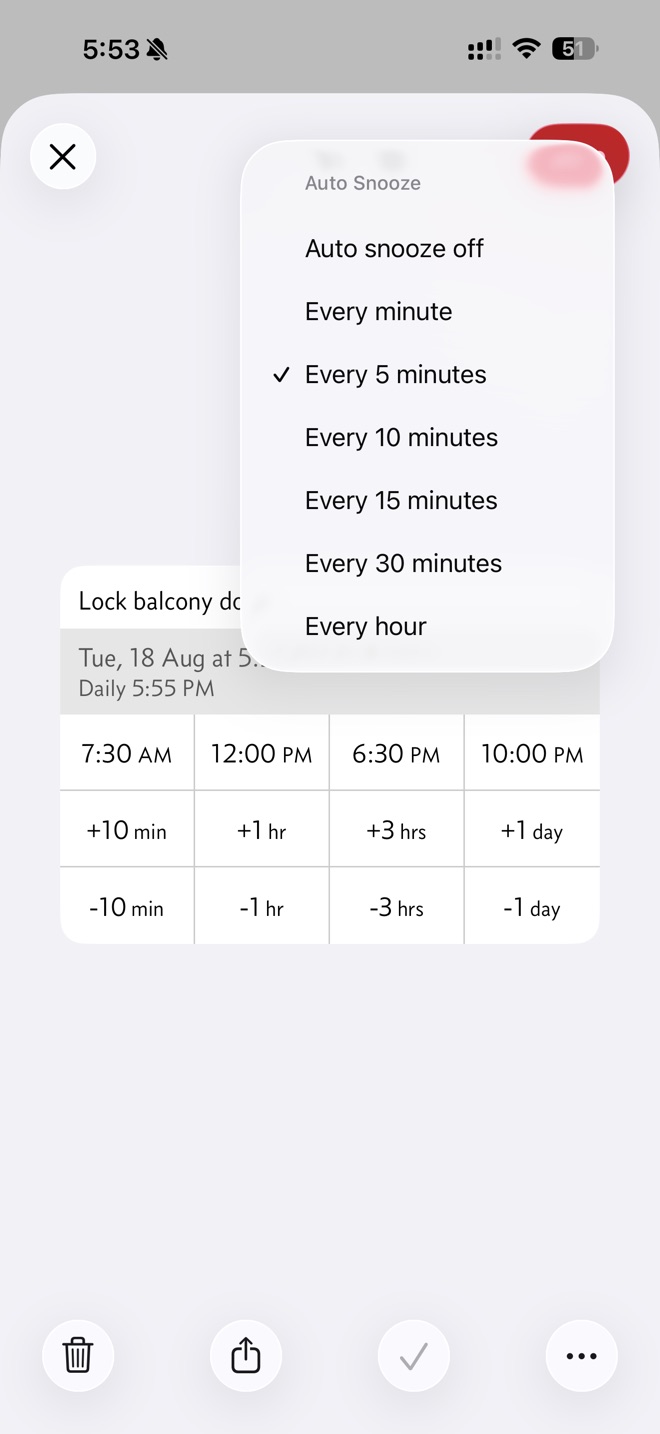
The zzz button opens this list. Every 5 minutes is ticked.
That is the only thing you do. From then on, if you ignore the reminder, Due carries on by itself:
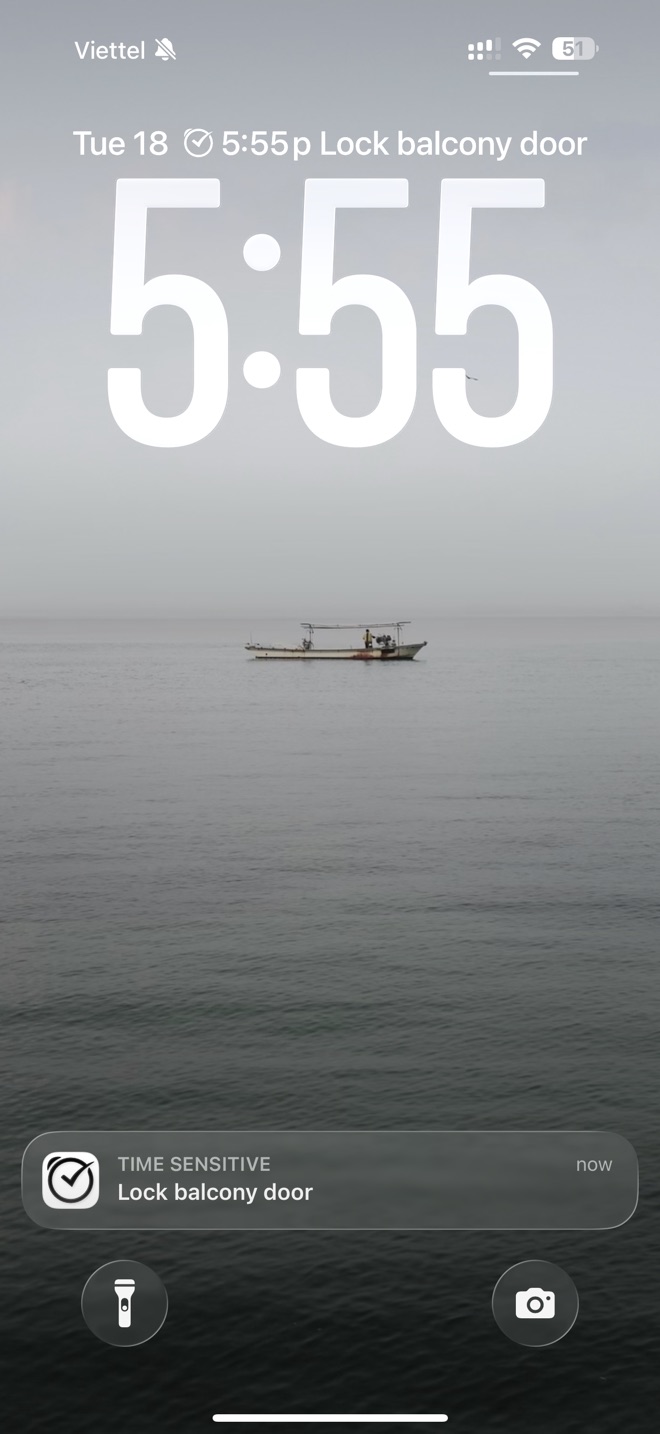
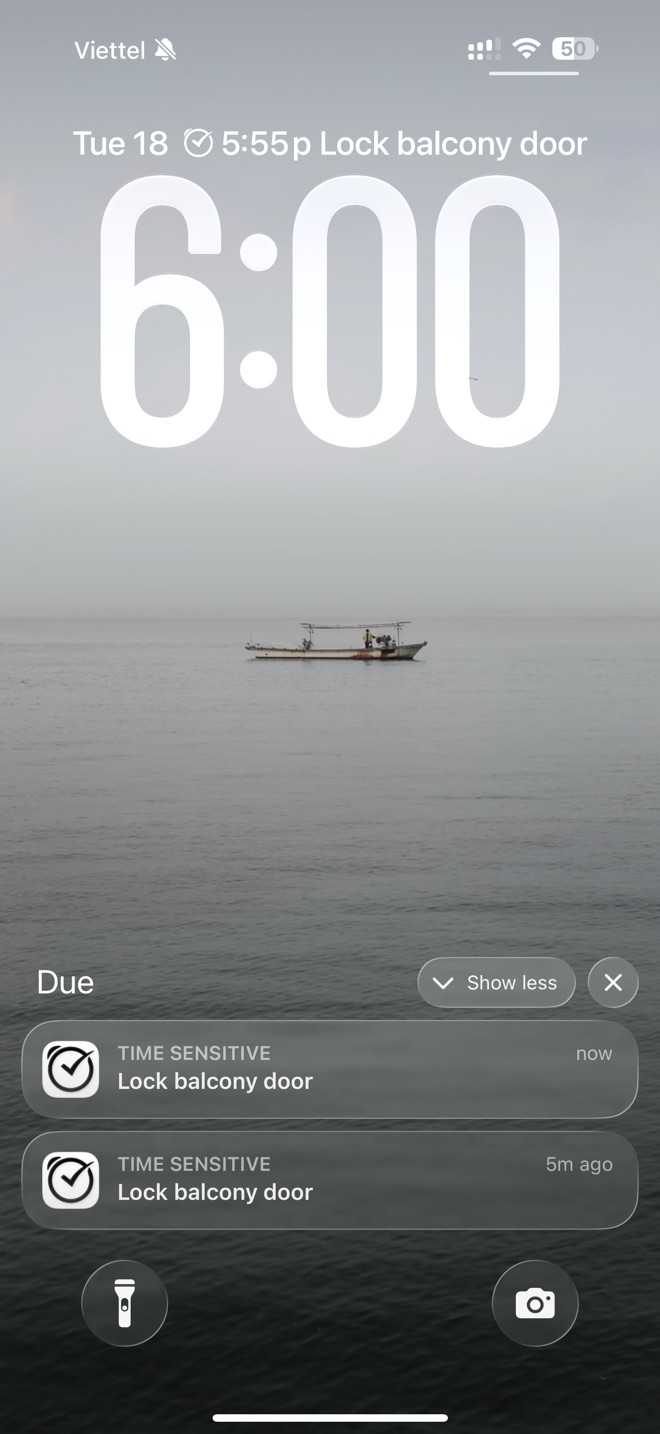
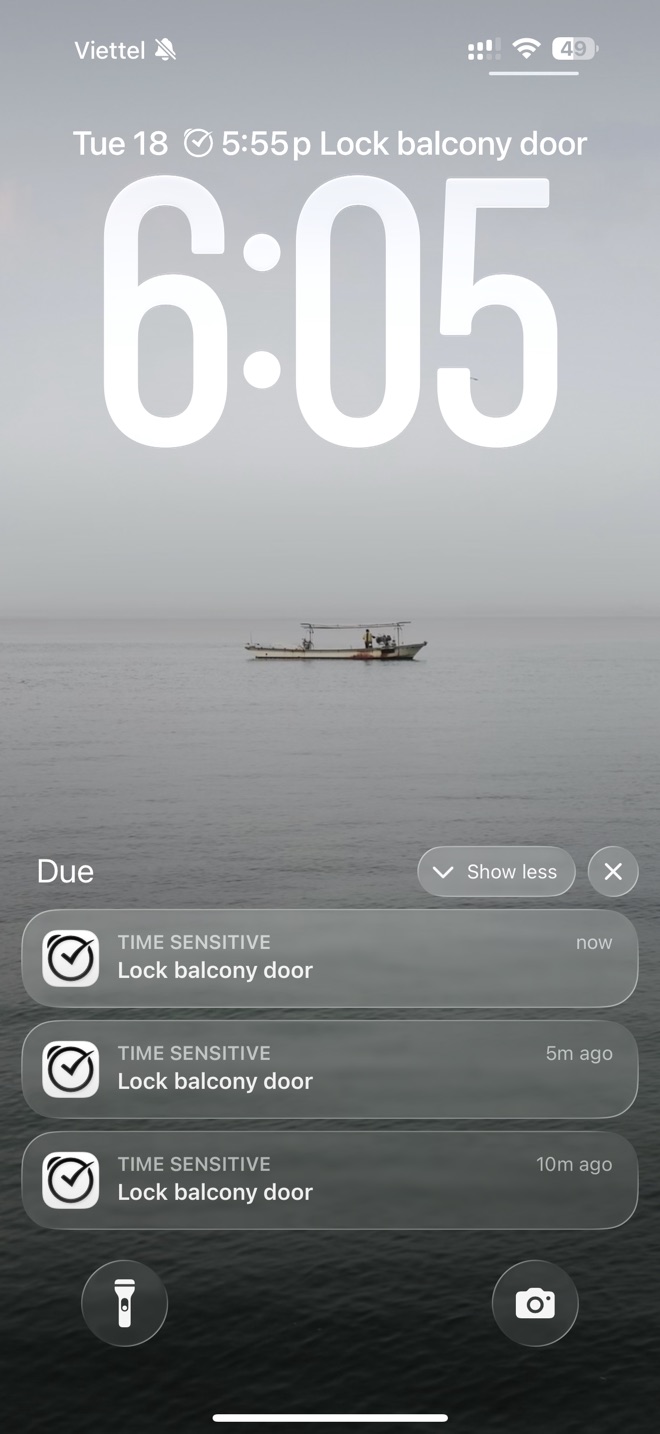
You pressed nothing. Each alert is a new one, and the older ones are still sitting there — now, 5m ago, 10m ago. Due keeps going until you deal with the reminder.
Snooze — you choose a new time
Now the same reminder, handled by hand. Press and hold the notification and Due shows you the reminder with a grid of times.
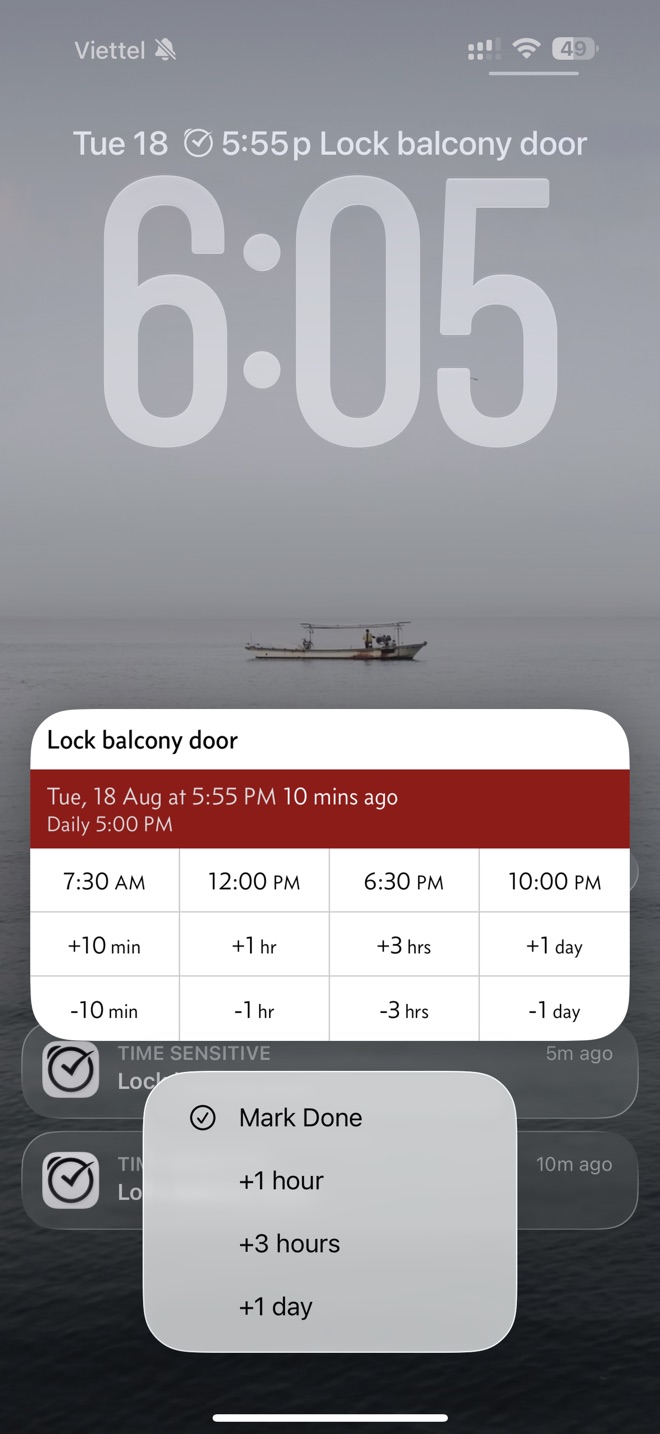
Nothing has been chosen yet, so the action reads Mark Done. The red band says the reminder is 10 minutes overdue.
Now tap a time in the grid — here 6:30 PM:
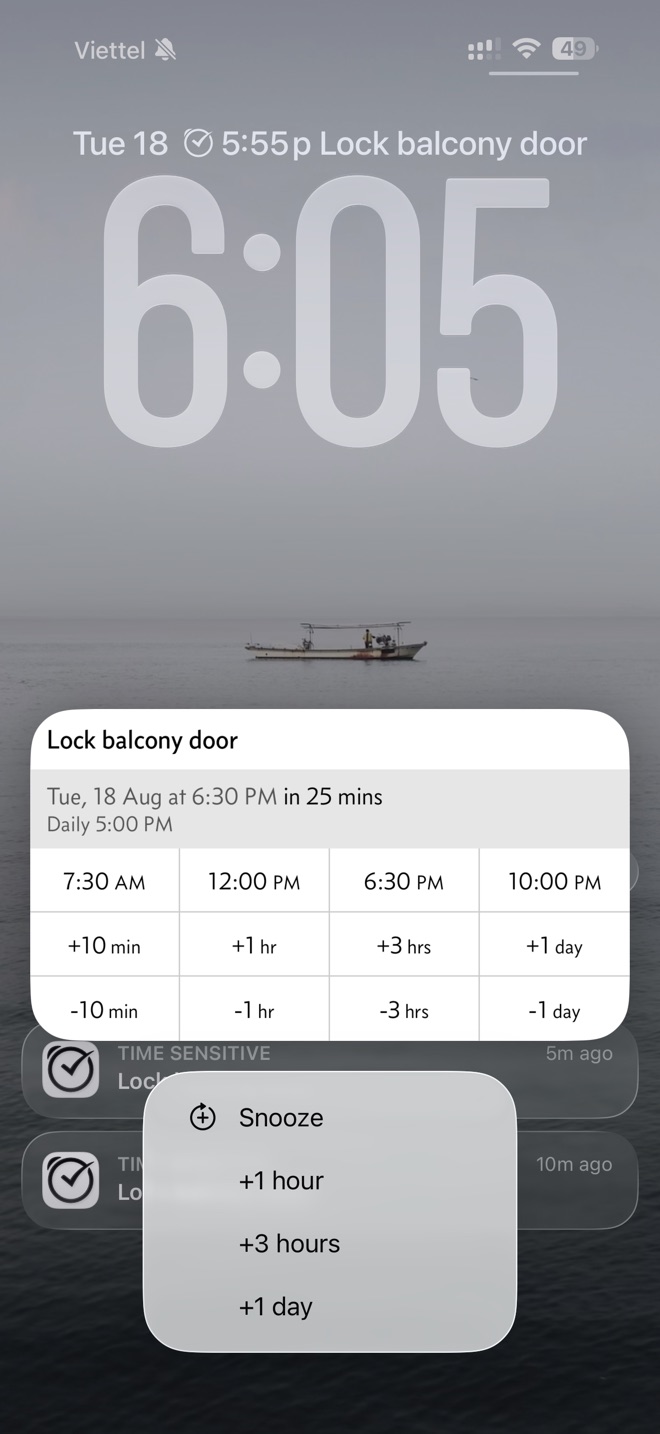
The action has changed to Snooze, and the band has turned grey: at 6:30 PM, in 25 mins.
That is what Snooze means in Due. You picked a new time, and Snooze moves the reminder to it. You do it yourself, and it happens once.
Notification Snooze — the ready-made buttons
Look at those last two screenshots again. Underneath the action, in both of them, sit three buttons: +1 hour, +3 hours, +1 day. Those are Notification Snooze.
There is nothing to choose, and nothing further to see. One tap, the notification goes away, and the reminder is postponed by that amount. They stay the same whether the action says Mark Done or Snooze, because they are not part of it.
Which three amounts appear is up to you. You set them in Settings, on a page with the same name:
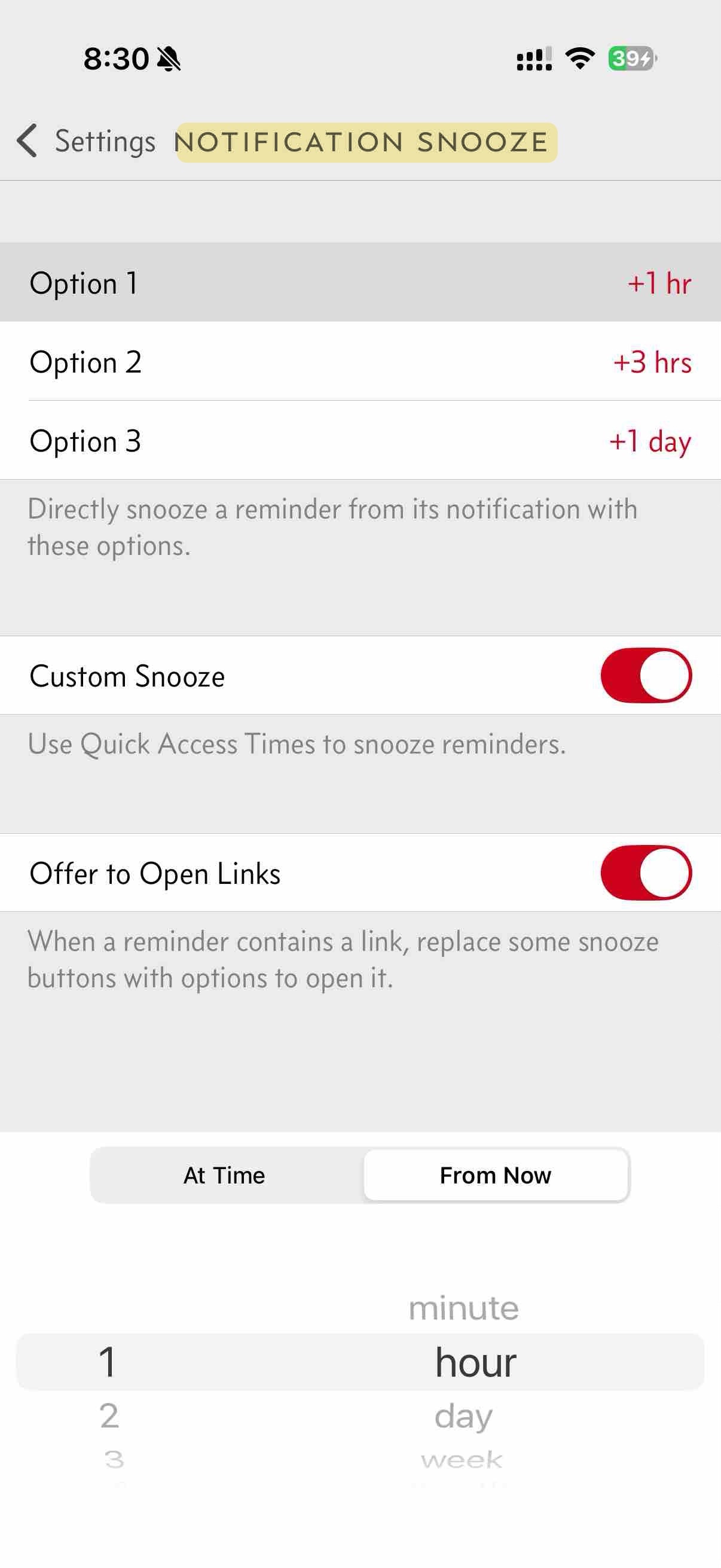
Option 1 is +1 hr, Option 2 is +3 hrs, Option 3 is +1 day — the three buttons you saw on the notification.
In Italian this button says Ritarda today, while Settings says Rinvio — see the question below.
In short
- Auto Snooze — you switch it on once, then the app alerts you again and again, by itself, until you deal with the reminder.
- Snooze — you pick a new time on the notification, and the reminder comes back then.
- Notification Snooze — the ready-made postpone buttons on the notification. One tap and it is done, with nothing to choose. The Settings page of the same name is where you pick which buttons appear.
Existing and proposed translations
In Italian the app is inconsistent today. Auto Snooze is half English — Snooze Automatico. Settings says Rinvio, and the button on the alert says Ritarda. I would like one word for the button, and a real Italian name for Auto Snooze.
| English in Due | Italian today | I am considering | Why |
|---|---|---|---|
| Auto Snooze | Snooze Automatico — half English | Sollecito Automatico — or Notifica insistente | Sollecito is the polite reminder you send when a payment is late. Notifica insistente means “insistent notification”. |
| Snooze | Rinvio in Settings · Ritarda on the alert | one word for both places | Two words for one thing is confusing. See the question below. |
| Notification Snooze | Snooze notifica | Posticipo notifica | Removes the English word from the page name. |
Which word for Snooze?
Today the same thing has two names:
- The button on the alert says Ritarda
- Settings says Rinvio
I want one word in all three places. The choices are:
- Posticipo — Apple uses Posticipa / Posticipo across iOS, in Calendar, Sleep and Reminders.
- Ritarda — the word already on Due’s alert button.
Which would you pick, and why?
Words Due already uses
These words already mean something specific in the Italian app, so the terms above cannot reuse them.
| English in Due | Italian in Due | What it means |
|---|---|---|
| Reminder | Promemoria | The things you write down |
| Repeat | Ripetizione | The repeating schedule — every Monday at 9 AM |
Final check
If you want a quick way to test the words, try saying these three sentences in Italian using the words you chose. All five terms — Reminder, Repeat, Auto Snooze, Snooze, Notification Snooze — should stay clearly different from each other.
- Create a Reminder for 9 AM, and set Repeat to daily.
- Turn on Auto Snooze every 5 minutes, so Due keeps alerting you until you mark it as done.
- When it alerts you, Snooze it for an hour, using one of the times you set in Notification Snooze.
If a sentence makes you reach for a different word to stay clear, that is useful. Please tell me which word you reached for.
What I’d like to know
Try your words on the screens below, then answer whichever questions you have an opinion on — you do not need to answer all of them. When you are done, press the button and your email app opens with everything already written out.
Before the questions, try your words on the real screens. Type a word and it replaces the English, highlighted, so you can see how it sits in the app.
The menu that switches it on
The action on the notification
The Settings page title
Is Sollecito Automatico better than Snooze Automatico, worse, or about the same? Or does Notifica insistente sound more natural? The word does not have to mean "auto" or "snooze". In Chinese we chose a phrase that just means keeps reminding you. Please do not reuse Promemoria or Ripetizione.
See the question above. Would you pick Posticipo or Ritarda, and why?
Is Posticipo notifica better than Snooze notifica? Remember this is the name of a Settings page, not something you do.
If a word is right but too long for a button, or you would use something different altogether, this is the place to say so.
Nothing is sent from this page. The button opens your own email app with your answers already written out, so you can read them before sending. If that does not work, use Copy my answers instead and paste them into an email to localization@dueapp.com.